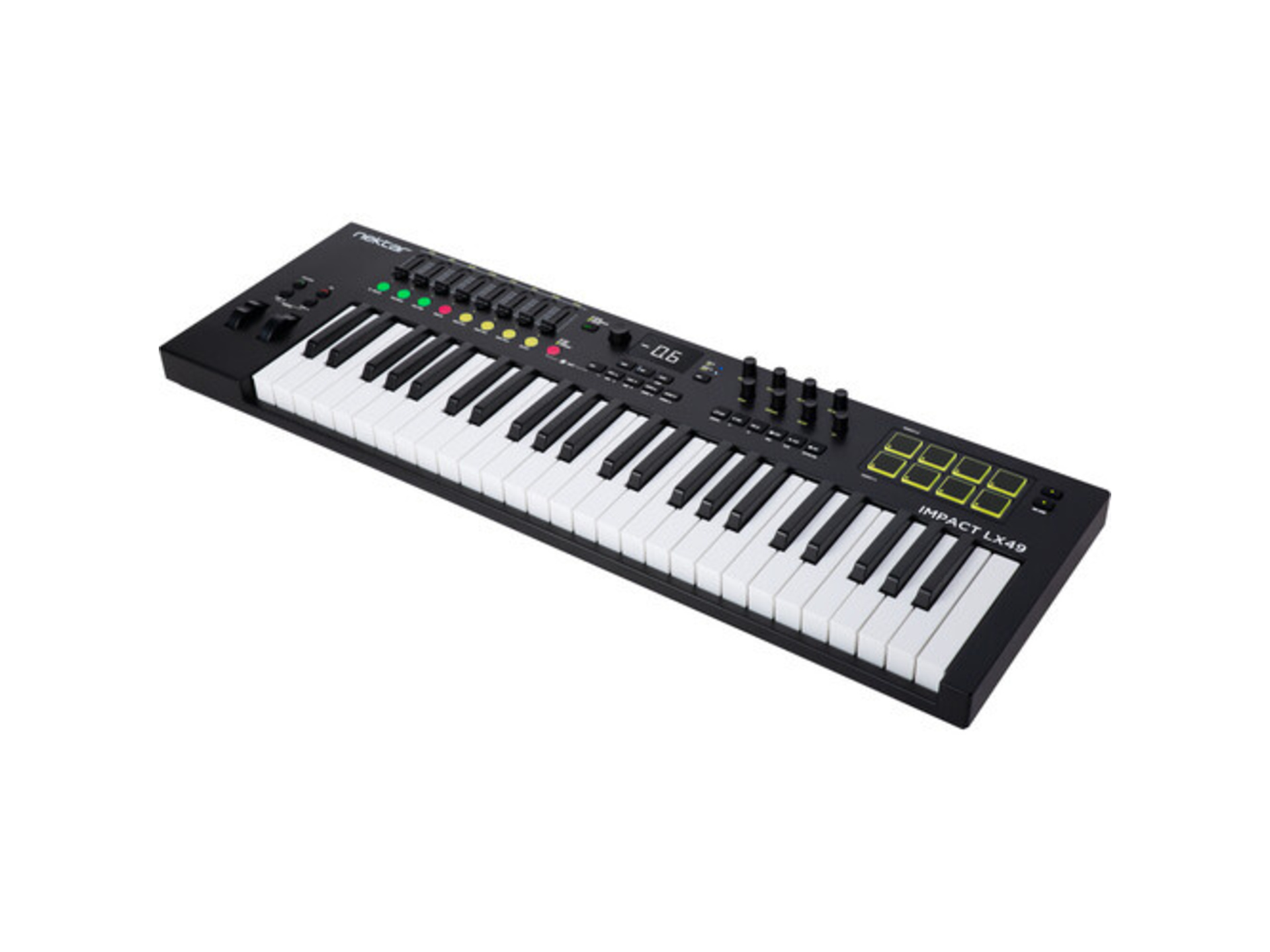
















































































































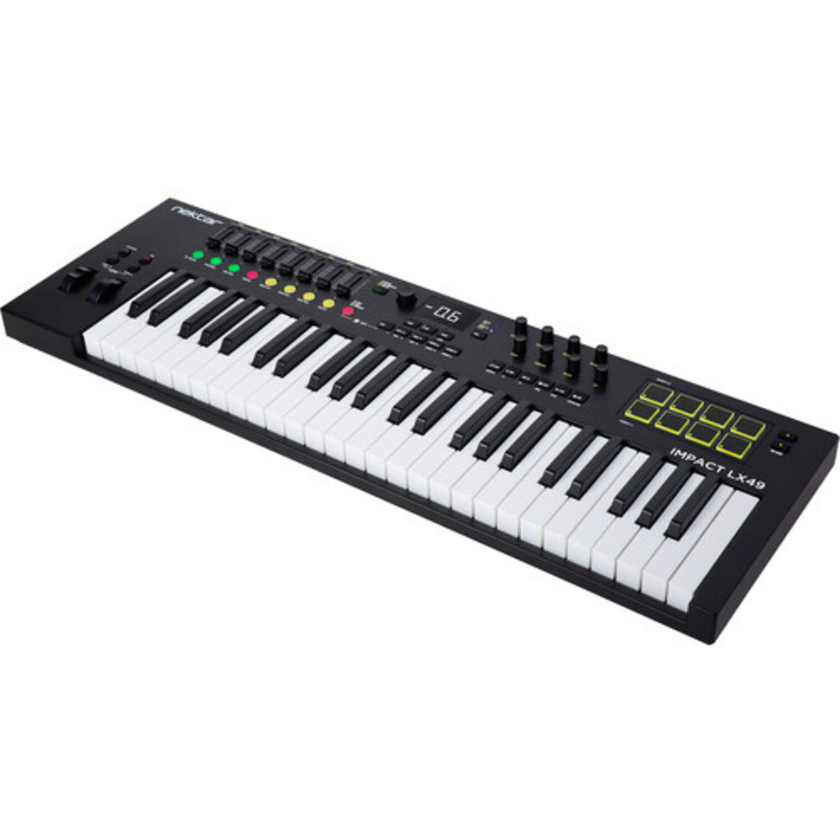


Engineered to provide a customized, DAW-integrated workflow that enhances both performance and production, the Nektar Technology Impact LX49 mk3 49 key MIDI controller w/8 pads with a reengineered keybed that offers expressive, clean action with a refined velocity response, full-resolution encoders, and color LED buttons that support intuitive parameter control and DAW navigation.
Looper and Timeline Navigation
Designed to augment the power of supported DAWs, Impact LX mk3 includes unique timeline options enabling fast navigation, as well as loop creation, throughout a project. Activating loop record via the dedicated Impact LX mk3 looper button is a creativity boosting experience in a linear DAW. With loop recording complete, loop points are automatically set, perfectly truncated to the part, and then playback of the recording begins. Artists no longer need to decide the length of a loop before recording starts and can move on to immediately overdub or record the next part more quickly. Loop points can be set or moved at any time and adjusted in length by just pressing LED buttons. The large encoder can scroll through the timeline, while the display bar position updates as the play head or loop moves.
Global Control
The large encoder is a global control that doesn't change operation when Mixer, Instrument, or Preset modes are selected. With Nektar DAW integration, the associated button toggles 3 encoder states: Channel volume. Cutoff (instrument). Selected parameter. The Selected parameter enables control of any DAW or plug-in parameter by simply clicking to select, then control. With multiple plug-in windows open, it’s a gratifying tactile control experience when moving from instrument to effect parameters.
Fine Control and Displaying Parameter Values
The Impact LX mk3's global encoder offers precise parameter control at either standard MIDI or a finer 10-bit resolution. This fine control option, pioneered on the Nektar Panorama CS12, delivers a level of UI-precise control that's typically not possible from a controller keyboard.
NKS Support
Native Instruments developed the Native Kontrol Standard (NKS), which is supported by thousands of plug-ins including the entire NI Komplete Select package, which is now part of the Impact LX mk3 software bundle. Navigating presets, plug-ins, and control pages can all be done from Impact LX mk3, with the 8 encoders dedicated to page parameter control.
Pads: Mapped to Drums and Percussion Plug-Ins
Press Mixer, and the eight pots are assigned to control the eight channels of your DAW's mixer. The alternate Bank up/down function moves control assignments to the next or previous group of eight channels. Press the Mixer button, and they switch to control panning. The fader is assigned to the currently selected channel so you always know where to find it. The pads also have alternate functions and can control muting for the current bank.
Mixer Mode: 8 Channel Mixing
With 8 channel control surface mixing, Impact LX mk3 controls volume, pan, solo, and mute, with LED colors used throughout to identify solo, mute, and arm status. The global encoder can control the currently selected track channel volume while the 8 encoders control the 8 track sends.
Instrument Mode: Default Mapping and Customization
Selecting Instrument Mode reassigns the faders and eight encoder controls to directly control the instrument hosted on your selected track. Many popular instruments come pre-mapped, with controls clearly labeled on the unit, eliminating guesswork. The LX mk3 also allows you to temporarily override Instrument Mode assignments to work with other parameter sets. Plus, customized mapping can be created and saved directly from Impact LX mk3, with most DAWs.
Hardware Performance Tools
For both novice and experienced keyboard players, performance tools offer powerful ways to enhance creativity and simplify complex playing. Impact LX mk3 includes new features such as Scale, Chord, and Hold, all of which can interact seamlessly. For example, Scale and Chord can be used together to ensure chords only contain notes within the selected scale. Then, free up a hand using Hold for either perfect legato or to hold specific notes and continue to play normally on the rest of the keyboard.
Included Software
Native Instruments Komplete Select 15: Packed with synths, sampled instruments, and studio effects, Komplete Select 15 is the perfect start to making music on your computer. Komplete Select is available in three curated editions: Beats, Band, and Electronic, each designed to suit specific genres and workflows. A license is included in the Impact LX mk3 box, ready to demonstrate the seamless connection between the Impact LX mk3 and NKS. Visit www.native-instruments.com for more information.
MOK Miniraze plug-in synth: The Miniraze plug-in by MOK is gaining momentum for its ability to generate unique and out-of-this-world sounds, blending modern wave-slicing technology with classic subtractive synthesis. Create new exciting sounds from aggressive, complex evolving textures to beautiful expressive instruments. Miniraze is a step towards the future with a nod to the past. And it’s set up to work perfectly with Impact LX mk3.
Bitwig Studio 8-track: Combining both linear and clip based recording along with a ton of instruments, effects, and content, Bitwig Studio gets the best out of Impact LX mk3. A Bitwig Studio 8-track license is included in the box, so you only need to plug in and get going.