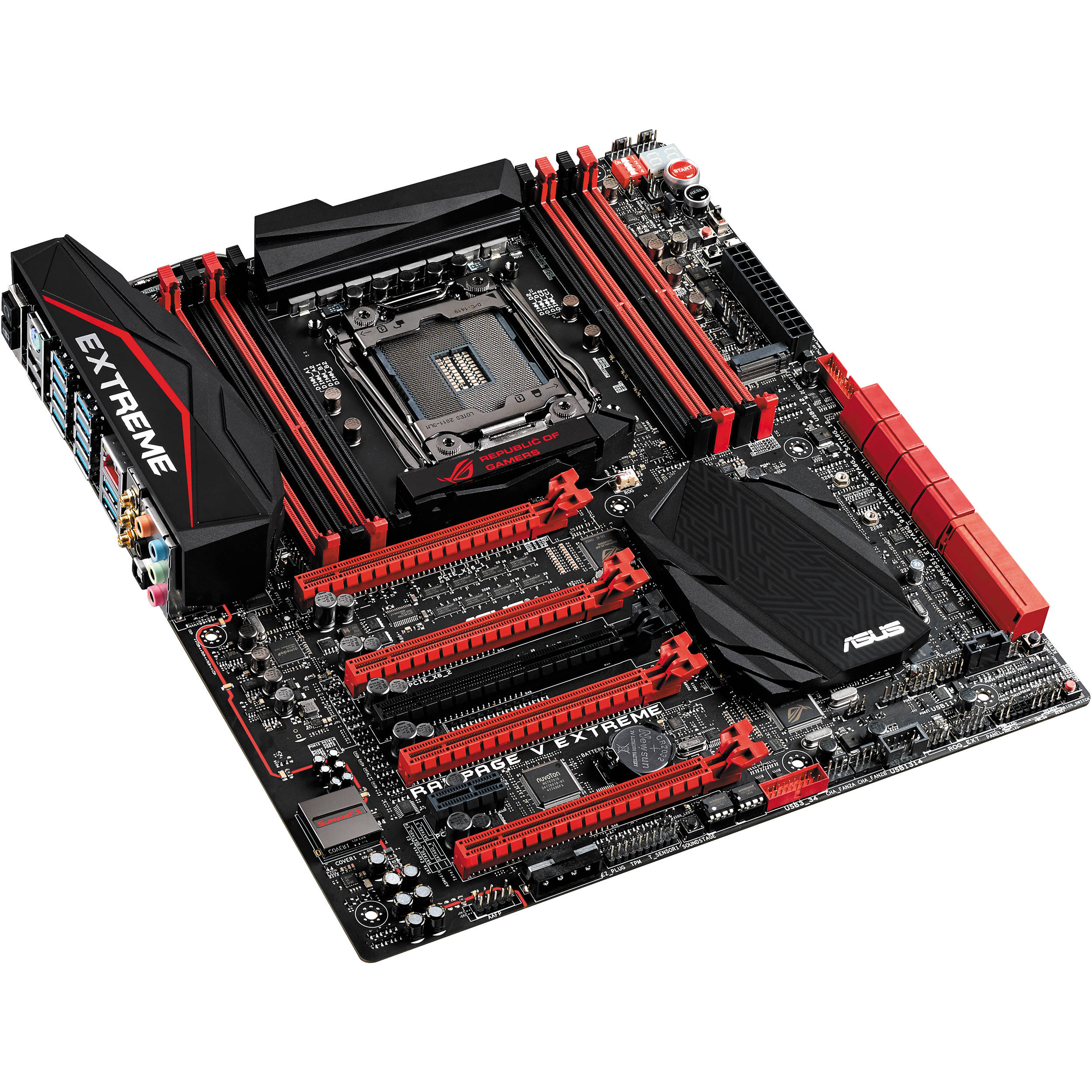




















































































































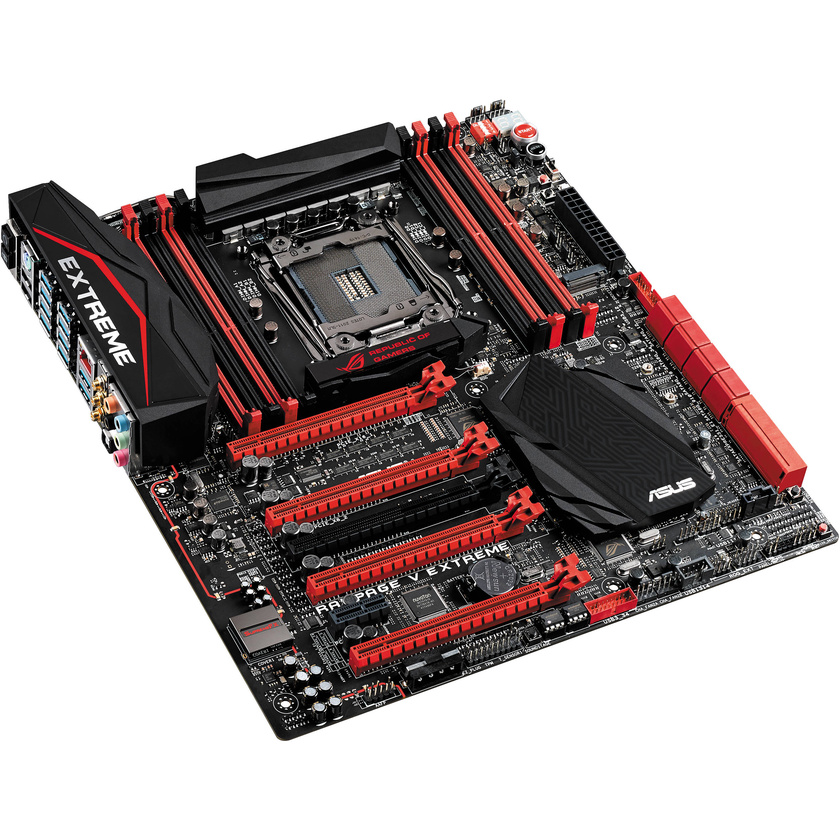
The Intel X99 Motherboard from Asus is designed to fit into standard size ATX cases. Compatible with Windows 8.1, 8, and 7, the 12.0 x 10.7" X99 supports Intel Core i7 processors and delivers power and speed to Internet browsing, gaming, CAD software, and home servers. Features include an OC socket, OC panel, safe boot, and ReTry buttons for extreme tuning. Combined with Asus UEFI (Unified Extensible Firmware Interface), this feature enables DDR4 memory frequencies and helps lower latencies and enhance stability while overclocking. The motherboard also features 5-Way Optimisation, which includes suitable CPU performance, power-saving and digital power control, fan control, and system cooling.
*Sonic SenseAmp and Sonic SoundStage support only analogue-audio front-panel (AAFP) connections
*5V output varies from PSUs to PSUs
Key Features
Hardware
Support 4-Way SLI/CrossFireX
- It has suitable spacing and PCIe 3.0 speed for graphics and it releases the full power of multiple graphics cards for optimal visuals. Onboard switches let you selectively enable or disable cards thus, quickly configuring multi-GPU setups.
OC Socket
Drive CPU and DDR4 Performance
- Asus OC Socket utilises extra pins to connect a proprietary circuit, to contacts found on Haswell-E's land grid array (LGA). Combined with the customised UEFI, this feature enables higher DDR4 memory frequencies, lower latencies and enhanced stability while overclocking, extending all the way to extreme overclocking conditions, such as Liquid Nitrogen (LN2). OC Socket is 100% compatible with new Haswell-E LGA 2011-v3 CPUs, ensuring the ideal combination of overclocking performance and compatibility.
Cache Bus Voltage Adjustment
- Cache bus links areas such as CPU cores, DDR4 memory controllers, system agent, and the shared L3 cache. It interconnects the whole CPU sub-system. Higher cache bus frequency directly gives faster total sub-system performance. The Asus OC Socket provides an adjustable cache bus voltage to reach high cache bus frequencies.
Overclocking
- It supports DDR4 memory, and it is capable of overclocking memory up to DDR4 3300+ MHz with all eight DIMMs. ASUS T-Topology circuit design plus patent-pending OC Socket releases the full potential of DDR4 by minimising crosstalk and signal reflections. Signal timing issues are reduced, resulting in improved stability and overall performance.
OC Panel
Overclocking Command Centre
- A 2.6" display keeps you informed and in full control, so that you can maximise the available power.
Normal Mode
- The OC panel can be installed directly into a 5.25" drive bay to provide real-time monitoring of multiple vital parameters, including CPU temperature, ratios, base clock and fan speeds. The CPU Level Up button provides instant control over two-stage overclocking, while CPU fan speeds can be adjusted to turbo, standard and silent modes.
Extreme Mode
- The OC panel can also be used as external overclocking console. In this mode, there are connectors and switches for ROG features including Subzero Sense, VGA SMB, VGA Hotwire, Slow Mode and Pause. You also have direct access to four-pin fan connectors, remote power, and reset buttons.
Safe Boot Button
- One quick tap of the Safe Boot button powers off your system and launches into Safe Mode, where you can tweak your retained previous settings.
ReTry Button
- If your system hangs during the power-on self-test (POST) boot process, just hit the motherboard's hardware-level ReTry button to force a reboot immediately.
Extreme Engine Digi+ IV
Power
- This platform has control over the power with voltage-regulator module (VRM). MicroFine alloy chokes lower overall core loss for lower temperatures, while the VRM has been upgraded with PowIRstage IR3555. This chip integrates the driver, high-side, and low-side MOSFETs and features the RDS On current-sensing technology. Extreme Engine Digi+ IV's high-frequency pulse-width modulation (PWM) implementation scales to 1MHz allowing the DRAM VRM to achieve a 40% increase in stability.
Cooling Environment
DirectCU Thermal Design
- This technology puts optimal conductive copper heat-pipes in direct contact with Rampage V Extreme's Extreme Engine Digi+ IV VRM zone to provide heat dissipation. Rampage V Extreme with DirectCU goes up to 7℃ cooler. The heat coming from the chokes and VRM zone is absorbed by the copper heatpipe and then dissipated through two large aluminium heat-sinks for optimal cooling.
X-Socket II
- Rampage V Extreme's three-piece X-Socket II makes user-friendly work of mounting your existing liquid-nitrogen (LN2) or dry-ice evaporator pots to the LGA2011-3 socket. Use the supplied star screwdriver to replace the LGA2011-3 backplate with X-Socket II to cool the system.
Thermal Sensor and Fan Connectors
- It has eight 4/3-pin (PWM/DC) combo fan connectors, FanXpert 3, seven thermal sensors, four onboard sensors, plus three additional 2-pin headers, and a selection of three thermal cables to help you monitor the temperatures of up to seven motherboard or key components in real time so that you are able to adjust CPU and case coolers automatically or manually for dissipation.
Gaming
SupremeFX 2014
- Isolation technologies minimise Electromagnetic Interference (EMI) and the components deliver optimal audio. SupremeFX 2014 has been refined for Rampage V Extreme that means finer components and software innovations for gaming and multimedia experiences are enhanced.
Sonic SenseAmp
- Sonic SenseAmp is an ROG invention that detects headphone impedance (below 65/65-150/150 or higher ohms) and adjusts the built-in amp automatically, for suitable pitch listening.
Sonic SoundStage
- Apply the settings for your favourite game in real time on any operating system, via the onboard Sonic SoundStage button. The debug LED displays the mode - FPS (01), racing (02), fighting (03) or sports (04)*.
1
Please Note:
- Premium Japanese-made ELNA audio capacitors offer natural and warm sound.
Sonic Studio
- Sonic Studio is an audio-tuning suite. Use the one-click Virtual Surround function to 7.1 channels, even through a stereo (2.0-channel) headset. It offers five more audio controls, including reverb, bass boost, equaliser, voice clarity, and Smart AEQ.
Noise Reduction
- The voice removes ambient noise with one-click, for crystal-clear in-game chat. Volume stabiliser normalises the microphone volumes for stable recording consistency, noise gate minimises ambient noise during sentences (i.e. pauses and periods of silence), and noise reduction analyses and calculates ambient noise with spectral-subtraction algorithm.
Sonic Radar II
- It is designed for First-Person Shooters (FPS) and displays a stealthy overlay that shows what opponents and team-mates are up to. Get the direction and origin of in-game sounds such as gunshots, footsteps and call-outs, and practice your enemy-pinpointing skills. Audio enhancement enhances in-game sound for optimal hearing awareness. The all-new Sonic Radar II includes a redesigned control panel with customisable game list.
Intel Ethernet
- Rampage V Extreme features the Intel Ethernet for fast and smooth gaming. Intel's LAN has the advantage of reducing CPU overhead and offering high TCP and UDP throughput. This significantly reduces the processor's workload, so that there is more power for your game and your gameplay.
UDP Game Data Performance
- IxChariot is an independent network-assessment test tool, to determine how much faster Intel Gigabit Ethernet deals with the smaller (sub-256 bytes) UDP data packets, that are vital for responsive gaming. With Rampage V Extreme your game-data packets flow up to two times (2x) faster than competing gaming-LAN technologies.
LANGuard - RJ-45
- Signal-coupling technology and surface-mounted capacitors improves the throughput, while surge-protected and electrostatically-guarded components (ESD Guards) protect your motherboard from lightning strikes and static electricity.
GameFirst III
- Helps you to assign game packets and allocate more bandwidth to the game, ensuring an enhanced online gaming experience. You can manage bandwidth down to the level of individual applications, with five priority levels and even the ability to block specific traffic. GameFirst III has a built-in network monitor tool, so you can supervise your network traffic and test your connection speed to cheque that you are getting optimal bandwidth.
KeyBot
- Plug your existing keyboard into the dedicated USB socket to activate the KeyBot micro-processor on the Rampage V Extreme. Use the easy-to-use utility to assign macros to function keys F1-F10 to launch any application with a single press or control multimedia playback and store up to 15 keystrokes per key.
RAMDisk
- With RAMDisk you can turn system memory into fast temporary storage. Put large files, such as game maps, into RAMDisk and make loading quick. The 2014 edition of RAMDisk allocates memory, so unused RAM is released back to the system when it is needed. You can protect your SSD drives, as RAMDisk reduces excessive reads and writes that can reduce life-span. The junction function serves as quick links between files and RAM storage. All files are automatically saved and restored to their specific locations on hard drives when you turn your PC off, and then go back to RAM when you power on again.
UEFI
UEFI BIOS
- The mouse-controlled graphical UEFI BIOS has been upgraded to deliver quick setup and user-friendly functions, with a more appealing design for optimal overclocking and DIY experiences. For a PC novice or a seasoned overclocker, the EZ and advanced modes help you find your way, quickly and easily.
EZ Mode
- The fan profile gives detailed CPU and case fan information for instant cooling. SATA information displays SATA port details for you to recognise devices. The fast clock adjustment uses mouse controls to change the time and date. EZ XMP improves your DRAM performance with a click.
- Shortcut customises your own shortcut log by pressing F4 or right clicking to create shortcuts to frequently-used settings. Quick note creates and save notes within the BIOS to help remember important settings and save time on trial and error. Last modified log tracks last change and save preferred profiles onto a USB drive, and SATA port renaming renames the SATA ports for easy identification.
Design
Truevolt USB
- ROG's TrueVolt USB design delivers a steady 5V* supply to both the front and back USB sockets without any drop-outs.
2
Please Note:
- It provides an all-round protection with a black nickel-coated Q-shield, a Q-slot, Q-DIMM, DRAM over-current protection, backplates, ESD guards, a stainless steel back I/O, and 10k black metallic capacitors.
Specifications
| CPU |
Intel Core i7 processors on LGA 2011-v3 socket Supports Intel 22 nm CPU Supports Intel Turbo Boost Technology (depends on the CPU type) |
| Chipset |
Intel X99 |
| Memory |
8 x DIMM (individual CPUs) Maximum 64 GB, DDR4 3200 (O.C.)/3000 (O.C.)/2800 (O.C.)/2666 (O.C.)/2400 (O.C.)/2133 MHz non-ECC, Un-buffered memory Quad channel memory architecture Supports Intel Extreme Memory Profile (XMP) |
| Multi-GPU Support |
Supports NVIDIA 4-Way SLI technology* Supports NVIDIA 3-Way SLI technology Supports NVIDIA SLI technology Supports AMD 4-Way CrossFireX technology Supports AMD 3-Way CrossFireX technology Supports AMD CrossFireX technology 1 Please Note:*28-LANE CPUs can only support up to 3-Way SLI/3-Way CrossFireX |
| Expansion Slots |
40-Lane CPU 4 x PCIe 3.0/2.0 x16 (x16, x16/x16, x16/x16/x8 or x16/x8/x8/x8)* 28-Lane CPU 4 x PCIe 3.0/2.0 x16 (x16, x16/x8, x8/x8/x8)* 1 x PCIe 2.0 x16 (x4 mode)** 1 x PCIe 2.0 x1** *The PCIE_X8_4 slot shares bandwidth with M.2 x 4. 40-LANE CPU: The PCIeX8_4 slot can only be used in x4 mode or lower when used simultaneously with the M.2 connector. If x8 mode is used, the two connectors will be mutually exclusive. 28-LANE CPU: The PCIE_X8_4 slot will be disabled and the M.2 connector will always be enabled. **The PCIE_X4_1 (gray) slot shares bandwidth with the PCIE_X1_1 slot, USB3_E910 and SATAExpress_E1 connector. When the PCIE_X4_1 slot is occupied by an X1 or X2 device, the SATAEXPRESS_E1 will be disabled. When the PCIE_X4_1 slot is occupied by X4 device, the SATAEXPRESS_E1, USB3_E910 ports, and the PCIE_X1_1 slot will be disabled. |
| Storage |
Intel Core i7 Processors: 1 x M.2 Socket 3, with M Key, type 2242/2260/2280/22110 storage devices support (Supports PCIE SSD only) Intel X99 Chipset: 1 x SATA Express port, compatible with 2 x SATA 6.0 Gb/s ports 8 x SATA 6 Gb/s port(s) Supports RAID 0, 1, 5, 10 Supports Intel Smart Response technology and Intel Rapid Recovery technology (works depending on CPU installed) ASMedia SATA Express controller* 1 x SATA Express port, compatible with 2 x SATA 6.0 Gb/s ports *These SATA ports share bandwidth with the PCIE_X4_1 slot, and when the PCIE_X4_1 slot is occupied, the SATA ports will be disabled. These SATA ports are for data hard drives only. ATAPI devices are not supported |
| LAN |
Intel I218V, 1 x Gigabit LAN Controller, featuring GAMEFIRST III Intel LAN- Dual interconnect between the Integrated LAN controller and Physical Layer (PHY) Anti-surge LANGuard |
| Wireless Data Network |
Wi-Fi 802.11a/b/g/n/ac Supports dual band frequency 2.4/5.0 GHz Up to 1300 Mb/s transfer speed Bluetooth V4.0 |
| Audio |
ROG SupremeFX 8-Channel High Definition Audio CODEC Supports: Jack-detection, Multi-streaming, Front panel jack-retasking SupremeFX Shielding technology ELNA premium audio capacitors Audio Feature: Blu-ray audio layer content protection DTS Connect Optical S/PDIF out port(s) at back panel Sonic SoundStage Sonic SenseAmp Sonic Studio Sonic Radar II |
| USB Ports |
Intel X99 Chipset: 4 x USB 3.0/2.0 ports (4 at mid-board) Intel X99 Chipset:* 6 x USB 2.0 ports (2 at back panel, 4 at mid-board) ASMedia USB 3.0 Controller:** 10 x USB 3.0/2.0 ports (10 at back panel) 2 Please Note:*2 x USB2.0 port at mid-board shares with ROG extension (ROG_EXT) port |
| OC Panel |
2.6 " LCM display EXTREME Mode for Subzero OC Benching:* VGA Hotwire Subzero Sense Slow Mode Pause Switch VGA SMB Header ProbeIt 4 x 4-pin extra fan connectors NORMAL Mode for In-Chassis Usage:** CPU Level Up OC button FanSpeed control button LCM backlight on/off button I/O Ports: POWER: 1 x SATA power connector ROG_EXT port: 1 x 18-1 pin data connection port 3 Please Note:*Extreme Mode capabilities, including V1, V2, DRAM and other voltage definitions, vary by chipset |
| ROG Features |
DirectCU thermal design: ROG Connect: RC Diagram RC Remote RC Poster Extreme Engine Digi+ IV: IR3555 PoweIRstage MicroFine Alloy Chokes 10K Black Metallic Capacitors ROG Extreme OC Kit: ReTry button Safe Boot button Start button Reset button Slow Mode LN2 Mode PCIe x16 Lane switch Debug LED ProbeIt KeyBot CPU Level Up XMP Direct Key UEFI BIOS Features: ROG BIOS Print GPU.DIMM Post Tweakers' Paradise ROG SSD Secure Erase Graphic Card Information Preview ROG RAMDisk GameFirst III iROG Extreme Tweaker USB BIOS Flashback Overclocking Protection: COP EX (Component overheat protection - EX) Voltiminder LED II |
| Special Features |
5-Way Optimisation by Dual Intelligent Processors 5: 5-Way Optimisation tuning key perfectly consolidates TPU, EPU, DIGI+ Power Control, Fan Xpert 3, and Turbo App Gamer's Guardian: ESD Guards on LAN, Audio, KBMS and USB3.0/2.0 ports> DRAM overcurrent protection 10K black metallic capacitors Stainless steel back I/O> ASUS Wi-Fi GO!: Wi-Fi GO! Function: Cloud GO!, Remote Desktop, Remote Keyboard, and Mouse, File Transfer Wi-Fi GO! and NFC Remote app for portable smartphone/tablet, supporting iOS 7 and Android 4.0 systems ASUS Features: MemOK! AI Suite 3 Ai Charger+ USB Charger+ USB 3.0 Boost Disk Unlocker ASUS EZ DIY ASUS CrashFree BIOS 3 ASUS EZ Flash 2 Push Notice ASUS Q-Design: ASUS Q-Shield ASUS Q-Code ASUS Q-LED (CPU, DRAM, VGA, Boot Device LED) ASUS Q-Slot ASUS Q-DIMM ASUS Q-Connector Overclocking Protection: ASUS C.P.R.(CPU Parameter Recall) Memory Streamer Turbo App Fan Xpert 3 |
| Back I/O Ports |
1 x PS/2 keyboard/mouse combo port 1 x LAN (RJ-45) port 10 x USB 3.0 ports (blue) 2 x USB 2.0 ports (one port can be switched to ROG Connect) 1 x Optical S/PDIF out 5 x Audio jacks 1 x Clear CMOS button 1 x ROG Connect on/off switch 1 x ASUS Wi-Fi GO! module (Wi-Fi 802.11 a/b/g/n/ac and Bluetooth v4.0) |
| Internal I/O Ports |
2 x USB 3.0 connectors support additional 4 USB 3.0 ports 2 x USB 2.0 connectors support additional 4 USB 2.0 ports 2 x SATA Express connector, with M key, type 2242/2260/2280 storage devices support (both SATA & PCIE mode) 1 x M.2 Socket 3 for M Key, type 2260/2280/22110 storage devices support (support PCIE SSD only) 1 x TPM header 8 x SATA 6 Gb/s connectors 1 x CPU fan connector (1 x 4 -pin) 1 x CPU OPT fan connector (1 x 4 -pin) 6 x Chassis fan connectors (6 x 4 -pin) 1 x Thunderbolt header 1 x 24-pins EATX power connector 1 x 8-pins ATX 12V power connector 1 x 4-pins ATX 12V power connector 1 x Front panel audio connector (AAFP) 1 x System panel (Q-Connector) 1 x MemOK! button 1 x Slow Mode switch 9 x ProbeIt Measurement Points 3 x Thermal sensor connectors 1 x EZ plug connector (4-pins Molex power connector) 1 x Power-on button 1 x Reset button 1 x BIOS switch button 1 x LN2 mode jumper 1 x ROG extension (ROG_EXT) header 1 x KeyBot button 1 x Sonic SoundStage button 1 x Safe Boot button 1 x ReTry button |
| BIOS |
2 x 128 Mb Flash ROM, UEFI AMI BIOS, PnP, DMI2.7, WfM2.0, SM BIOS 2.8, ACPI 5.0, Multi-language BIOS, ASUS EZ flash 2, CrashFree BIOS 3, F11 EZ tuning wizard, F6 Qfan control, F3 my favourites, quick note, Last modified log, F12 PrintScreen, F3 shortcut functions and ASUS DRAM SPD (Serial Presence Detect) memory information |
| Manageability |
WfM2.0, DMI2.7, WOL by PME, PXE |
| Support Disc |
Drivers ROG GameFirst III ROG RAMDisk ROG CPU-Z ROG Mem TweakIt Kaspersky Anti-Virus DAEMON tools pro-standard ASUS WebStorage HomeCloud ASUS Utilities |
| Compatibility |
Windows 8.1/8/7 |
| Form Factor |
ATX |
| Dimensions |
12 x 10.7" (30.5 x 27.2 cm) |