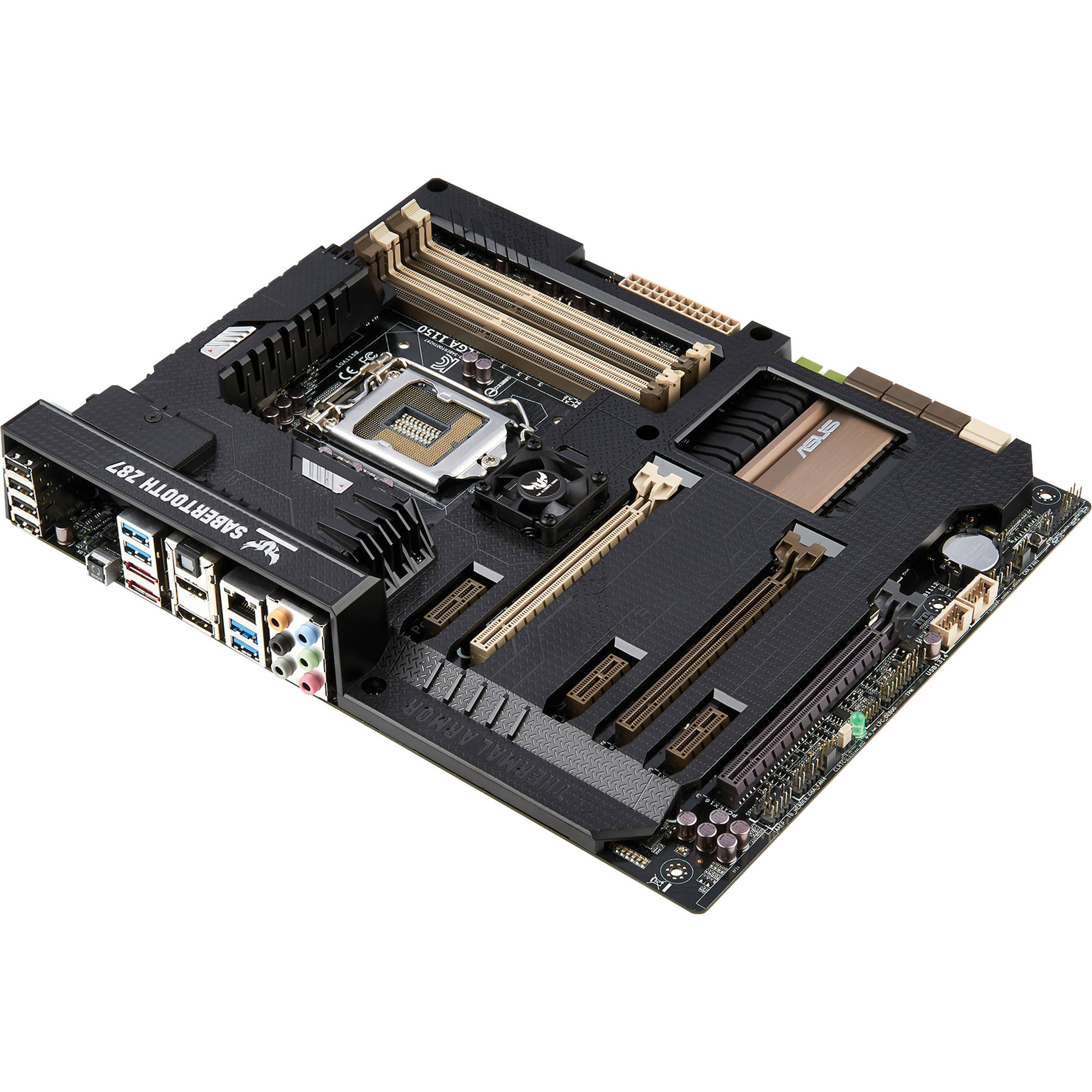


















































































































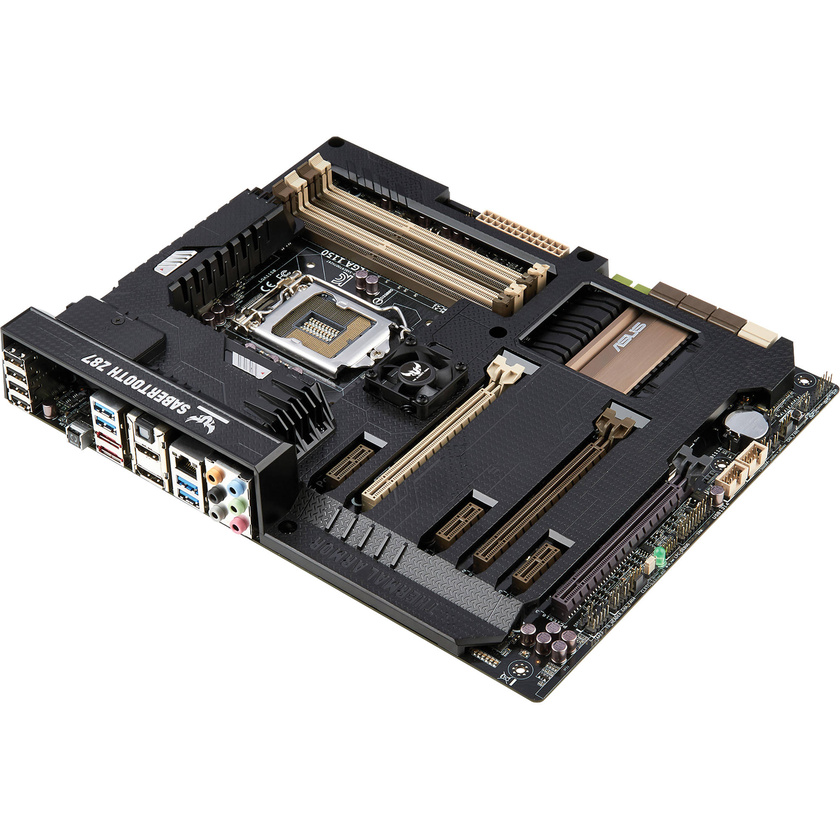
The SABRETOOTH Z87 LGA 1150 Motherboard from ASUS is an ATX form factor motherboard that supports LGA1150 socket for 4th generation Intel Core i7/i5/i3/Pentium/Celeron processors. It is equipped with four DIMM slots, maximum 32GB, DDR3 1866/1600/1333 MHz non-ECC, un-buffered memory. The motherboard is equipped with two PCIe 3.0/2.0 x16 (x16 or dual x8), one PCIe 2.0 x16 (x4 mode, black), and three PCIe x1 slots. This motherboard brings you multi-GPU support using NVIDIA SLI/AMD CrossFireX. The Z87 chipset optimises PCIe allocation in multiple graphics card configurations. It has a dedicated button to access the BIOS directly. The ASUS boot setting provides optimal flexibility in customising your PC's startup process.
Key Features
Tactical Armour, Fortified Reliability
TUF /tΛf/, stands for the Ultimate Force
- With the unique design and quality components (military-standard), TUF series provides stability, all-round compatibility, and durability
TUF Fortifier
TUF Fortifier - Bolsters Boards Against Bending Damage
- TUF Fortifier adds a strong backplate so the motherboard does not buckle under the weight of heavy graphics cards and CPU coolers. Reduced PCB bowing and bending means an end to potentially damaged circuitry
With a thermal pad directing heat away from VRM and other key components, TUF Fortifier combines strength and cooling
Prevent Bending - Prevents Bending Due to Heavy Components
- TUF Fortifier can handle more weight than that of heavy CPU coolers and graphics cards, giving you a huge safety margin. Even the largest and heaviest can be installed with no risk of causing motherboard PCB stressing
Enhanced Heat Conduction - For Better VRM Cooling and DIY Safety
- TUF Fortifier uses a thermal pad attached to the motherboard, directing heat away from key components such as VRMs and MOSFETs, enhancing system cooling
TUF Fortifier also protects DIY builders from solder pins and other sharp motherboard parts - preventing cuts
Thermal Armour with Flow Valve
Thermal Armour with Flow Valve - Total Airflow-Boosting Heat Dissipation
- Covers the entire board and features dual fans to direct cool air to critical parts and dissipate heat faster for optimal stability. It boosts airflow and cooling with dual fans and a smart shunt design that directs hot air away from critical components. Air power is improved with a back I/O fan that pulls in cold air and expels more heat. Exclusive flow valve design controls heatpipe air contact, optimal-utilising liquid cooling setups
Flow Valve - Control Airflow for Cooling Flexibility
- New generation Thermal Armour features an exclusive flow gate design In open state, the flow valve allows cool airflow from downdraught fans into Thermal Armour, maximising airflow for fan-based thermal setups When closed, it focuses air on high-efficiency heat-pipes for faster heat removal. This is especially useful for liquid cooling
Convection Holes - PCB Convection Hole for Enhanced Cooling
- Openings in the board are strategically-placed to improve air circulation and ensure effective cooling reaches under the board. PCB convection holes lower in-case temperatures, adding to system stability and endurance
Thermal Radar 2
Thermal Radar 2 - Complete System Cooling, Customised Fan Tuning
- With multiple onboard sensors and bundled thermistor cables, you can real-time monitor temperatures for areas around key components other than the motherboard itself. Customisable fan control gives you the flexibility of adjusting fan speeds manually and achieving optimal thermal tuning with one click
Thermal Tuning - System Thermal Tuning in One Click
- Thermal Radar 2 provides whole system fan optimisation with a single click. This achieves optimal cooling for your components beyond just the mere number of fans in your case. Based on the characteristics of each fan connected to your motherboard, all fan profiles can be quickly optimised
Fan Control - Manually Fan Speed Management
- Gives customised settings for each fan, which can be easily changed. You can supervise fan speeds to balance cooling and noise emissions, and fans can be manually managed, individually controlled, and even named. All these promote better cooling, noise reduction, and power saving
Safety and Stability
Dust Defender - Repel the Dust, Expand the Lifespan
- TUF design protects back I/O ports, expansion and memory slots plus critical connectors from dust and particles that degrade system performance over time if left unchecked. With a filter to ensure the back I/O fan does not draw dust into the board, Dust Defender guards against dust build up, helping your PC perform in an optimal and stable state longer
ESD Guard - Ultra-Protection against Electrostatic Discharge
- Electrostatic discharges (ESD) can happen suddenly, and their damaging effects are often underestimated. Exclusive ASUS ESD Guard circuit design and the included I/O shield provide four times the protection to extend component lifespan
Server-Grade Test
- All TUF Series motherboards pass a testing programme during development, undergoing extreme temperature and humidity trials. These tests result in reliable motherboards that are ready for intense daily computing and heavy-duty usage with the utmost stability
TUF Components
Certified for Tough Duty
- TUF Black Metallic capacitors, chokes, and MOSFETs are screened by seven military-grade tests to ensure enhanced lifespan under demanding conditions
Ti-Cap - Japan-made 10k Black Metallic Caps
- Black Metallic capacitors with military-standard certification offer +20% high and low temperature tolerance and five times longer lifetime usage
Choke and MOSFETS - TUF Alloy Chokes and MOSFETs
- Chokes made of high-grade anti-oxidisation materials for durability. TUF MOSFETs also pass military-grade tests with lower RDS (on), certified for tough duty
UEFI BIOS
UEFI BIOS - Full-Scale Performance Tuning with BIOS Interface
- UEFI BIOS from ASUS offers mouse-controlled graphical interface designed with a special theme for TUF boards, providing a user-friendly interface that goes beyond traditional keyboard-only controls. It also fully-utilises 2.2TB and larger hard drives in 64-bit operating systems with native support. ASUS EZ Mode displays frequently-accessed info, so you can alter system performance settings and drag and drop boot priorities. Advanced Mode for performance enthusiasts includes detailed DRAM settings via a dedicated memory info page for complete insight
EZ Mode
- Fast Clock Adjustment Easily change the time and date in EZ Mode using the mouse
EZ XMP Settings Quickly apply XMP settings in UEFI BIOS EZ Mode, achieving enhanced DRAM performance
EZ Fan Settings As demanded by the community, detailed fan controls come to EZ Mode so you can switch fan profiles for cooling and noise-level supervision
SATA Information Displays each SATA port details for you to recognise devices
My Favourites - Get All Your Favourite Functions on One Page
- F4 or right click to add settings to My Favourites under Advanced Mode, which cuts time spent on searching and further speeds up system tuning
Shortcut - One Press to Apply and Access Frequent Settings
- Now you can customise your own shortcut log by pressing F4 or right clicking to create shortcuts to frequently-used settings. Instantly access them by simply hitting the F3 hotkey
Quick Note
- Quick Note works inside the BIOS so you can just type remarks and ideas to help you remember important settings information and save time on trial and error
Last Modified
- This friendly function creates a tuning log to track your BIOS settings history, which can be saved onto a USB drive
SATA Port Renaming
- You can rename your SATA ports for easy identification, including by usage scenario. Get convenience and spend less time on finding the right devices when you want to change settings
Windows 8 Exclusive Features
DirectKey - Dedicated Direct BIOS Access Button
- Designed for those requiring frequent BIOS access, users can easily enter the BIOS when the PC is on standby power with a simple press of a button. It saves you time during boot-up as you do not have to repeatedly press the DEL key
ASUS Boot Setting - Multiple Startup Options
- ASUS Windows 8 hardware optimisation, ASUS Boot Setting provides optimal flexibility in customising your PC's startup process. You can shorten system boot-up time to 2 seconds for a smooth user experience under Windows 8, and even previous versions of Windows. Also, you can enter the BIOS directly with one click through a user-friendly interface, and select your preferred system boot up method either gets to the OS in seconds or option for regular boot up. Whatever your choice, settings are saved and persistent, with no need to choose every time you power on
Probe II Sense - Handy System Monitoring
- ASUS real-time system monitoring software is now available for Windows 8. It helps you supervise your entire PC through a live tile on the Windows 8 start screen, and make quick adjustments. Probe II Sense is a free application available from the Windows Store
Additional Features
USB 3.0 BOOST (UASP Support)
- ASUS USB 3.0 Boost technology supports UASP (USB Attached SCSI Protocol) USB 3.0 in Windows 8. With USB 3.0 Boost technology, a USB device's transmission speed is increased up to 170%, adding to already fast USB 3.0 performance. ASUS software automatically accelerates data rates for compatible USB 3.0 peripherals without any user interaction
USB BIOS Flashback - Simple Plug and Press Hardware-Based Bios Flashing
- Hardware-level USB BIOS Flashback allows you to update to UEFI BIOS versions even without a CPU or DRAM installed. Just plug in a USB flash drive containing the BIOS file and press the BIOS Flashback button for 3 seconds with the power supply connected
USB Charger+ - Two Times Faster Multi-Mode Charging for a Wide Range of Smart Devices
- With a dedicated onboard controller, quick-charge your smart devices, including smart phones and tablets. All charge up to two times faster than standard USB, even when the PC is powered off or in sleep/hibernate modes. It is done via the friendly AI Suite 3 interface
DIGI+ Power Control - Digital Power Control Solution
- DIGI+ Power Control is one of the most essential motherboard designs, and TUF offers precise memory tuning in addition to extra-accurate CPU voltage control. Best in class power efficiency and stability reduces wasteful voltage discrepancies and provides a stable CPU and memory setup
Remote GO! - One-Stop PC Remote Control and Home Entertainment
- Remote GO! links PCs, tablets, smart phones, and TVs wirelessly through a LAN cable and router. It supports: Cloud GO! - sync and backup your cloud storage Remote Desktop - cheque your PC in real-time from mobile devices DLNA Media Hub - easier streaming multimedia content File Transfer - send and share files between your PC and smart devices with only a right click on the mouse
AI Suite 3 - One-Stop Access to ASUS Features
- AI Suite 3 offers a clear interface with support for large monitors. It consolidates ASUS features into one simple-to-use package, allowing you to supervise overclocking, energy consumption, fan speeds, voltages and more. This all-in-one application offers diverse and easy to use functionality, with no need to switch back and forth between different utilities
Multi-GPU/Monitors
4K Ultra HD Ready
- You are ready for the upgrade to 4K Ultra HD thanks to integrated graphics that natively support up to 4096 x 2160 via HDMI or DisplayPort. That is four times the pixel count of 1080p (1920 x 1080), offering visual clarity, detail, and realism
Connect up to Three Full HD Monitors Via One Port
- DisplayPort 1.2 with Multi-Stream Transport (MST) allows you to connect up to three 1080p displays to a single output with daisy chaining, splitting the signal into three Full HD (1080p @ 60 Hz) links
Intel Collage Display
- Intel Collage Display allows images to be shown across multiple monitors, with each depicting a portion of a larger image. You can connect multiple displays to a single system and get video on several monitors with higher quality and resolution up to 4K. Connect up to six displays to drive a total resolution as high as 7680 x 1200 for Horizontal Collage Display or 3840 x 2400 for Vertical Collage Display with special dongles, like DisplayPort splitter adapters. Horizontal mode offers an extended desktop experience that is suitable for commercial applications such as finance, while vertical mode offers a simple way to enjoy 4K ultra HD content using standard HD displays
Quad-GPU SLI and Quad-GPU CrossFireX Support
- Brings you multi-GPU support using NVIDIA SLI or AMD CrossFireX. The Z87 chipset optimises PCI Express allocation in multiple graphics card configurations, for enhanced gaming experience
CPU, Chipset Features, and Transfer Technology
Intel LGA1150 4th Generation Core i7/i5/i3/Pentium/Celeron Processors Ready
- This motherboard supports Intel 4th generation Core i7/i5/i3/Pentium/Celeron processors in the LGA1150 package, with iGPU, memory, and PCIe controllers integrated to support onboard graphics output with dedicated chipsets, 2-channel (4 DIMM) DDR3 memory and 16 PCIe 3.0/2.0 lanes. This provides enhanced graphics performance
Intel Z87 Express Chipset
- The Intel Z87 Express Chipset is a single-chipset design that supports socket LGA1150 4th generation Intel Core i7/i5/i3/Pentium/Celeron processors. It provides improved performance by utilising serial point-to-point links, allowing increased bandwidth and stability. Additionally, Z87 provides a maximum six USB 3.0 ports and six SATA 6 Gb/s ports for faster data retrieval. Moreover, the Intel Z87 Express Chipset also supports iGPU functions, letting users enjoy the Intel integrated graphics performance
Intel Smart Response Technology - SSD Speed with HDD Capacity
- Uses an installed SSD (minimum 18.6GB available capacity required) as a cache for frequently-accessed data. Key benefits include reduced load and wait times, and lower power consumption through the elimination of unnecessary hard drive spin. This technology combines SSD performance with hard drive capacity, operating up to six times faster than a hard drive-only system
Intel Smart Connect Technology - Auto Application Refresh and Shorter Wait Times
- Your computer can receive web updates with fresh content for selected applications, even when the system is in sleep mode. This means less time waiting for applications to update and sync with the cloud, leading to a more efficient computing experience
Intel Rapid Start Technology - Instantly Awaken your PC from Sleep Mode
- Allows your computer to resume from a low-power hibernate state in seconds. Saving your system memory to the designated SSD, it provides your computer a faster wake-up response time, while still keeping energy use low
RoHS
GreenASUS
- Motherboards are EU Energy-related Products (ErP) ready, which requires products meet high efficiency standards about energy consumption. This is in line with the ASUS vision of creating environmentally-friendly and energy-efficient products through design and innovation that reduce the carbon footprint of products and thus mitigate ecological impact
Specifications
| CPU |
Intel socket 1150 for 4th generation Core i7/Core i5/Core i3/Pentium/Celeron processors Supports Intel 22 nm CPU Supports Intel Turbo Boost Technology 2.0* 1 Please Note:*The Intel Turbo Boost Technology 2.0 support depends on the CPU types. |
| Chipset |
Intel Z87 |
| Memory |
4 x DIMM*, maximum 32 GB, DDR3 1866/1600/1333 MHz non-ECC, un-buffered memory Dual Channel Memory Architecture Supports Intel Extreme Memory Profile (XMP) 2 Please Note:*Hyper DIMM support is subject to the physical characteristics of individual CPUs. |
| Graphic Controller |
Integrated graphics processor Multi-VGA Output Support: HDMI/DisplayPort ports * - Supports HDMI with maximum resolution 4096 x 2160 at 24 Hz / 2560 x 1600 at 60 Hz - Supports DisplayPort with maximum resolution 4096 x 2160 at 24 Hz / 3840 x 2160 at 60 Hz Maximum shared memory of 1024 MB Supports Intel InTru 3D, Quick Sync Video, Clear Video HD Technology, Insider 3 Please Note:*DisplayPort 1.2 Multi-Stream Transport compliant, supports DisplayPort 1.2 monitor daisy chain up to 3 displays. |
| Multi-GPU Support |
Supports NVIDIA Quad-GPU SLI Technology Supports AMD Quad-GPU CrossFireX Technology |
| Expansion Slots |
2 x PCIe 3.0/2.0 x16 (x16 or dual x8) 1 x PCIe 2.0 x16 (x4 mode, black) 3 x PCIe x1 |
| Storage |
Intel Z87 Chipset: 6 x SATA 6 Gb/s ports (brown) Support Raid 0, 1, 5, 10 Supports Intel Smart Response Technology, Intel Rapid Start Technology, Intel Smart Connect Technology ASMedia ASM1061 Controller*: 2 x SATA 6 Gb/s ports (beige) ASMedia ASM1061 Controller*: 2 x eSATA 6 Gb/s ports (red) 4 Please Note:*These SATA ports are for data hard drivers only. ATAPI devices are not supported. |
| LAN |
Intel I217V 1 x Gigabit LAN controller |
| Audio |
Realtek ALC1150 8-channel high definition audio CODEC - Supports: Jack-detection, multi-streaming, front panel jack-retasking - High quality 112 dB SNR stereo playback output (line-out at rear) and 104 dB SNR recording input (line-in) Audio Feature: - Absolute pitch 192 KHz/24-bit True BD lossless sound - Optical S/PDIF out port at back panel - BD audio layer content protection |
| USB Ports |
Intel Z87 Chipset: 6 x USB 3.0/2.0 ports (4 at back panel, blue, 2 at mid-board) 8 x USB 2.0/1.1 ports (4 at back panel, black, 4 at mid-board) |
| Special Features |
Power Design: - 8 +2 digital phase power design - TUF Components (Alloy choke, Ti-Cap. and MOSFET; certified by military-standard) Thermal Solution: - TUF Thermal Armour with Flow Valve - TUF Thermal Radar 2 Guardian Angel: - Dust Defender - TUF Fortifier ASUS Exclusive Features: - Remote GO! - USB BIOS Flashback - MemOK! - AI Suite 3 - Ai Charger - ESD Guards - Front Panel USB 3.0 Support - ASUS UEFI BIOS EZ Mode featuring friendly graphics user interface - Network iControl - USB 3.0 Boost ASUS EZ DIY: - DirectKey - Precision Tweaker 2 - ASUS O.C. Profile - ASUS CrashFree BIOS 3 - ASUS EZ Flash 2 - Multi-Language BIOS ASUS Q-Design: - ASUS Q-Shield - ASUS Q-LED (CPU, DRAM, VGA, Boot Device LED) - ASUS Q-Slot - ASUS Q-DIMM - ASUS Q-Connector |
| Back I/O Ports |
1 x DisplayPort 1 x HDMI 2 x eSATA 6 Gb/s 1 x LAN (RJ-45) port 4 x USB 3.0 (blue) 4 x USB 2.0 1 x Optical S/PDIF out 6 x Audio jacks 1 x USB BIOS flashback button |
| Internal I/O Ports |
1 x USB 3.0 connector support additional 2 x USB 3.0 port (19-pin, moss green) 2 x USB 2.0 connector support additional 4 x USB 2.0 port 1 x TPM header 8 x SATA 6 Gb/s connector 1 x CPU fan connector (1 x 4 -pin) 1 x CPU OPT fan connector (1 x 4 -pin) 4 x Chassis fan connectors (4 x 4 -pin) 2 x Assistant fan connectors (2 x 3 -pin) 1 x S/PDIF out header 1 x 24-pin EATX power connector 1 x 8-pin ATX 12V power connector 1 x Front panel connector 1 x Front panel audio connector (AAFP) 1 x DirectKey button 1 x DRCT header 1 x MemOK! button 3 x Thermal sensor connector 1 x Clear CMOS jumper |
| BIOS |
64 Mb Flash ROM, UEFI AMI BIOS, PnP, DMI2.7, WfM2.0, SM BIOS 2.7, ACPI 5.0, Multi-language BIOS, ASUS EZ Flash 2, ASUS CrashFree BIOS 3, My Favourites, Quick Note, Last Modified log, F12 PrintScreen, F3 Shortcut functions, and ASUS DRAM SPD (Serial Presence Detect) memory information |
| Manageability |
WfM 2.0, DMI 2.7, WOL by PME, PXE |
| Support Disc |
Drivers ASUS utilities ASUS/TUF CPU-Z Anti-virus software (OEM version) |
| Operating System Support |
Windows 8.1 Windows 8 Windows 7 |
| Form Factor |
ATX form factor 12.0 x 9.6" (30.5 x 24.4 cm) |